

By Gari Ciodaro, Co-Founder and CTO of Recall Space GmbH
If your purchase orders, supplier master data and delivery history already sit in Databricks, Lisa AI can read them where they live and write every decision back as data. No export project, and no new platform for your team to operate.
Purchase order confirmations look like a solved problem. The supplier sends back what they will deliver, someone checks it against the PO, and SAP gets updated. In practice, this is where much of the daily friction in purchasing sits: partial confirmations, quiet price changes, shifted delivery dates and split shipments, all arriving as PDFs and emails in every format imaginable.
Most discussion about automating this step focuses on the AI: can a model read the document? That part has become the easy bit. The harder questions are about data. Where does the PO data come from? Who is allowed to see the supplier's documents? Where does the evidence behind each decision live, and how does the approved result reach SAP without creating duplicates?
For companies that run their analytics and data engineering on Databricks, most of those questions already have an answer. This article explains how Lisa AI, Recall Space's purchasing agent, uses Databricks as the data layer for PO confirmations: what it reads, what it writes back, and what stays where.
Reading the confirmation is the easy part
Automating a PO confirmation means deciding, line by line, whether what the supplier promised is acceptable. Extraction is only the first of five steps:
- Extract the confirmation: lines, article references, quantities, units, prices and dates, from whatever format the supplier uses.
- Match each confirmed line to the right PO line, including split deliveries and lines the supplier renamed or merged.
- Compare ordered against confirmed values and identify every deviation in quantity, price basis, currency or date.
- Decide whether a deviation is within tolerance, needs a buyer, or should go back to the supplier, based on the company's own rules and supplier playbooks.
- Hand off the approved result to SAP, typically as an ORDRSP IDoc, and verify that it was actually processed.
Steps 2 to 5 depend entirely on data the AI model does not have by itself: the open POs, the supplier's history, agreed tolerances and the SAP mapping. They also depend on governance. A buyer reviewing an exception needs to see the source document and the reasoning, and an auditor later needs to see the same thing.
That is why the data layer decides whether PO automation works in production, not the model.
Why Databricks fits this workflow
Many wholesalers and manufacturers have already done the hard work of bringing ERP, supplier and logistics data into a lakehouse. PO automation that needs its own copy of that data means another export, another security review and a second set of access rules.
Connecting Lisa AI to Databricks turns that around:
- The data is already there. Lisa AI reads open PO lines, supplier master data and delivery history from your tables through a SQL warehouse, instead of waiting for an export.
- Governance is already defined. Lisa AI reads with its own service principal, and Unity Catalog decides which tables it may see. The results it writes back fall under the same rules.
- Nothing new to operate. Your platform team grants access and a schema to write to. It does not host or run the application; Recall Space does.
- Results stay analysable. Every confirmation, deviation and buyer decision is written back to your workspace as tables. Supplier reliability, recurring price deviations and approval times can be analysed with the tools the company already uses.
The last point is easy to overlook. Once confirmations become structured, governed data, they stop being an operational chore and start feeding supplier performance management.
A reference architecture
Lisa AI runs as a service operated by Recall Space. Databricks connects to it at two points: where Lisa AI looks up the purchase orders a confirmation refers to, and where it writes the results back. Each component has one clear job.
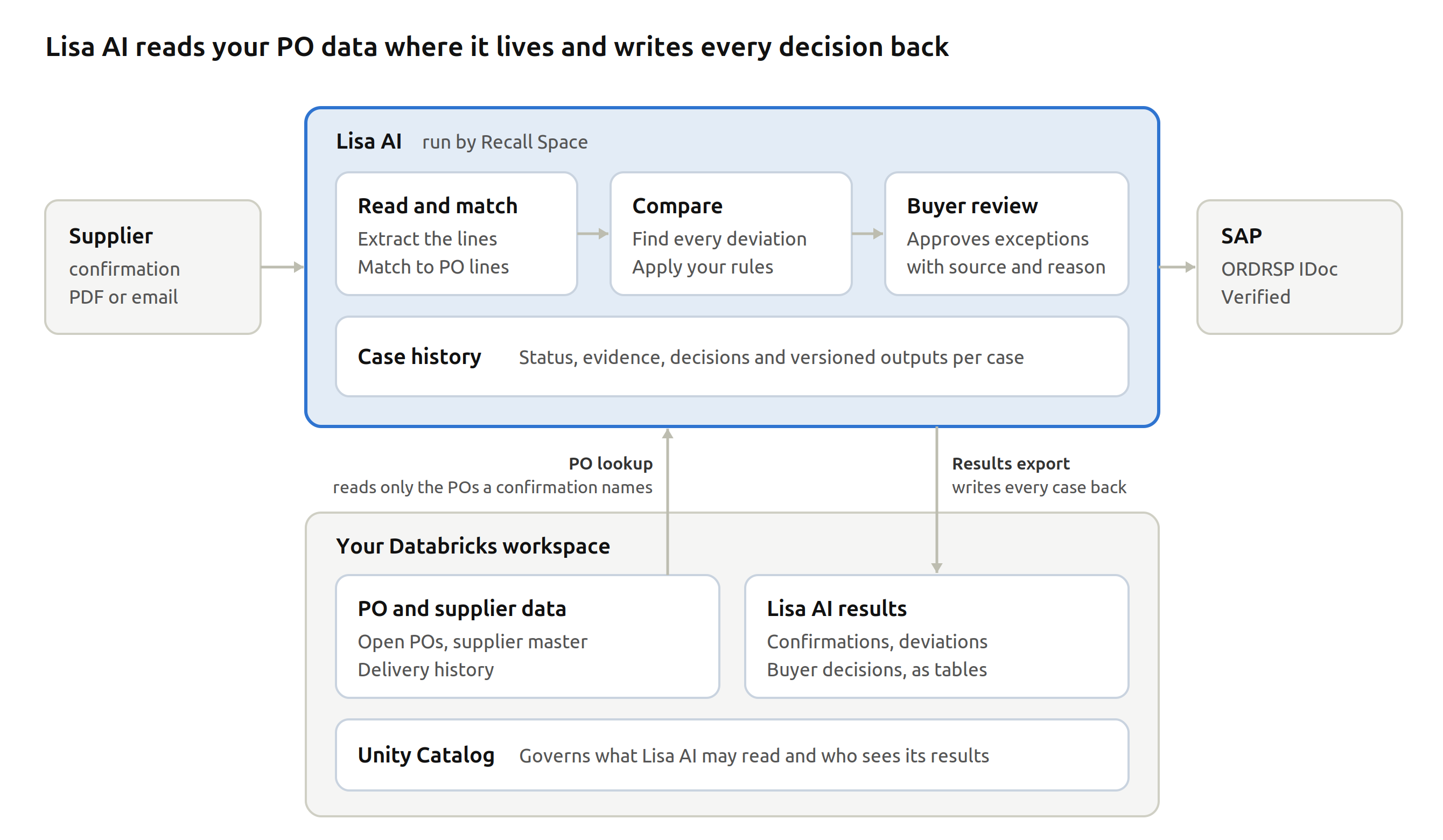
When a confirmation arrives, Lisa AI reads the PO lines it refers to from your Databricks tables, compares them with what the supplier confirmed and recommends an action. Buyers review the exceptions in Lisa AI. Approved results go to SAP, and every case is written back to your workspace.
- PO lookup reads only the purchase orders a confirmation names, from Unity Catalog tables through a SQL warehouse, and keeps a snapshot of exactly what it read as evidence for the decision.
- Lisa AI extracts, matches and compares, and recommends an action for every deviation. It recommends; it does not act on its own.
- Buyer review shows the deviation, the source document, the recommended action and an approval step.
- Results export writes confirmations, deviations and decisions to a schema in your workspace, ready to join with your PO and supplier data.
- Unity Catalog governs both directions: what Lisa AI may read, and who may see what it writes.
- SAP integration receives approved confirmation data through your existing ORDRSP IDoc process.
Optional: run the reasoning in your workspace
Some organisations want the AI step itself to run under their own controls. Lisa AI's reasoning engine is a self-contained library, so it can also be packaged to run as a Lakeflow Job in your workspace, calling your own model serving endpoints.
This keeps the model calls, and the documents they see, inside the workspace. It is a larger project, though. Case status, buyer review and the SAP handoff stay in Lisa AI, so the data crossing the boundary changes rather than disappears. Two Databricks behaviours also need planning: a repaired task restarts from the beginning and can repeat earlier writes (Databricks docs), and serverless jobs have a start-up time that varies by mode (Databricks docs). We scope this option per customer rather than offer it as the default.
Four design rules for production
Connecting to Databricks is straightforward. Making PO automation safe for purchasing takes a few deliberate choices.
1. Read only what the decision needs, and keep what was read
Lisa AI does not copy your PO tables. For each confirmation it reads the purchase orders the supplier refers to and stores that snapshot with the case. When an auditor asks why a deviation was accepted, the answer rests on the data the decision actually used, even if the table has changed since.
2. Waiting for a buyer is a state, not a running process
Some confirmations need human judgment, and some arrive before the PO data is complete. The case is stored as waiting and nothing keeps running. When the buyer decides, or the missing data appears, the case continues from that point. No compute sits idle while someone is in a meeting.
3. Retries are not idempotency
Networks fail and messages get delivered twice. For analytics, a repeated write is usually harmless. For purchasing, a duplicated IDoc is not. Every step that has an effect needs a stable identity, so a repeated request returns the same result instead of acting twice. That applies to the SAP handoff, and to the results written back to Databricks: a retried export should replace rows, not count a deviation twice.
4. Sending an IDoc is not the same as SAP processing it
An ORDRSP IDoc that leaves the workflow can still fail in SAP because of inbound configuration or missing approvals. The case is only closed when the outcome is verified. Lisa AI prepares and hands over approved confirmation data. It does not silently change price conditions in SAP.
What a deployment needs
A deployment is a joint project between purchasing, the platform team and Recall Space. Responsibilities split naturally:
| Area | Provided by | What it covers |
|---|---|---|
| Data access | Customer platform team | Service principal, SQL warehouse, read access to PO, supplier and delivery tables |
| Results schema | Customer platform team | A schema Lisa AI can write to, and who may read it |
| PO and supplier data | Customer, mapped by Recall Space | Which tables hold open POs, supplier master data and delivery history |
| Model access | Agreed jointly | Which model endpoints are used and where they run |
| Purchasing rules | Purchasing, configured by Recall Space | Tolerances, supplier playbooks, escalation paths |
| SAP connectivity | Customer IT, mapped by Recall Space | ORDRSP IDoc mapping, inbound configuration, monitoring |
| Lisa AI service | Recall Space | Extraction, matching, decision logic, buyer review, operation and upgrades |
Be precise about the data boundary
Reading data from Databricks does not mean every step happens inside the workspace. Lisa AI reads the PO lines a confirmation needs, processes them in its own service together with the supplier's document, and calls a language model. A credible deployment states exactly which data goes where: which tables are read, which model endpoints are called and where they run, and what is written back. That architecture is agreed with IT during scoping rather than assumed.
Start with one supplier flow
The best first step is deliberately small: one supplier flow, read access to your PO tables and an agreed SAP handoff. That is enough to see what Lisa AI understood, why it recommends a decision, and exactly what would be handed to SAP, using your documents rather than a demo.
If your purchasing data already lives in Databricks and you want to connect Lisa AI to it, talk to us. We will scope data access, the results schema and the SAP handoff with your platform team.
Sources
- Automating purchase order confirmations in SAP with Lisa AI, Recall Space
- Connect to a SQL warehouse, Databricks documentation
- Manage privileges in Unity Catalog, Databricks documentation
- Lakeflow Jobs, Databricks documentation
- Repair job failures, Databricks documentation
- Run serverless jobs, Databricks documentation
.png)
